
Hunyuan3D-2.0系列模型部署
环境准备
基础配置环境如下:
bash
PyTorch  2.5.1
Python  3.12
Cuda  12.4
ubuntu 22.04拉取项目仓库
安装git并验证版本信息
bash
sudo apt install git
git --version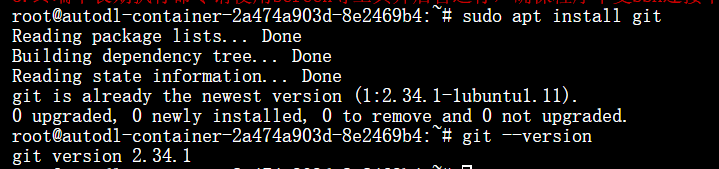
使用git clone拉取Hunyuan3D-2仓库
bash
git clone https://github.com/Tencent/Hunyuan3D-2.gitgit clone拉取GitHub项目失败/太慢可以使用提供下载缓存的代码下载网站gitclone.com加速
bash
git clone https://gitclone.com/github.com/Tencent/Hunyuan3D-2.git安装环境依赖
pip换源加速,进入项目目录,下载、安装依赖包
bash
# 升级pip
python -m pip install --upgrade pip
# 更换 pypi 源加速库
pip config set global.index-url https://pypi.tuna.tsinghua.edu.cn/simple

cd ./Hunyuan3D-2
pip install -r requirements.txt

# for texture
cd hy3dgen/texgen/custom_rasterizer
python3 setup.py install

cd ../../..
cd hy3dgen/texgen/differentiable_renderer
python3 setup.py install考虑到部分同学配置环境可能会遇到一些问题,我们在 AutoDL 平台准备了 Hunyuan3D-2 的环境镜像,点击下方链接并直接创建 Autodl 示例即可。 https://www.codewithgpu.com/i/datawhalechina/self-llm/Hunyuan3D-2
模型下载
执行官方代码会自动拉取huggingface模型,并存储至根目录缓存
也可以选择配置镜像网址"https://hf-mirror.com"加速,并将模型下载至指定数据盘目录
bash
export HF_ENDPOINT="https://hf-mirror.com"
source ~/.bashrc
# Hunyuan3D-2
huggingface-cli download --resume-download tencent/Hunyuan3D-2 --local-dir /root/autodl-tmp/weights/Hunyuan3D-2
# Hunyuan3D-2mv
huggingface-cli download --resume-download tencent/Hunyuan3D-2mv --local-dir /root/autodl-tmp/weights/Hunyuan3D-2mv
#Hunyuan3D-2mini
huggingface-cli download --resume-download tencent/Hunyuan3D-2mini --local-dir /root/autodl-tmp/weights/Hunyuan3D-2miniHunyuan3D-2的仓库较大,约为56GB,可以使用魔搭社区的’AI-ModelScope/Hunyuan3D-2‘模型仓库进行下载拉取
bash
import torch
from modelscope import snapshot_download, AutoModel, AutoTokenizer
import os
model_dir = snapshot_download('AI-ModelScope/Hunyuan3D-2', cache_dir='/root/autodl-tmp/weights', revision='master')记得将‘—local-dir’后或’cache_dir‘的路径替换为自己存放的本地数据盘路径
截至2025.3.20,Hunyuan3D-2模型仓库大小约为56GB,Hunyuan3D-2mv为28GB,Hunyuan3D-2mini为23GB,请参考官方运行硬件要求以及显存消耗拉取所需模型仓库,完整拉取供需106GB硬盘空间